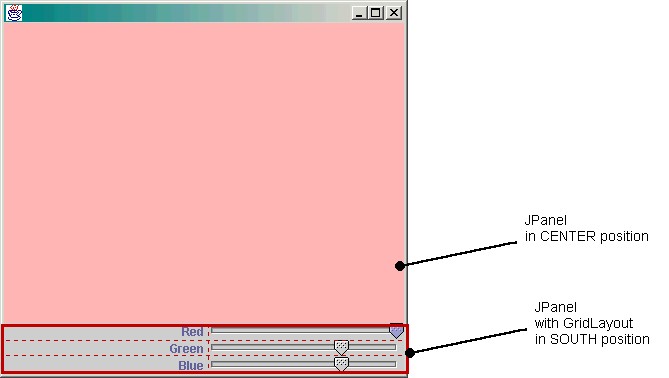
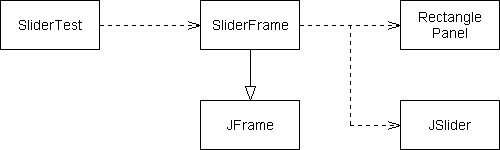
panel.add(textField, BorderLayout.SOUTH);
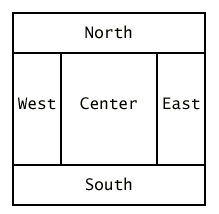
frame.getContentPane().add(textField, BorderLayout.SOUTH);
public class MyPanel
{
   public void paintComponent(Graphics g)
   {
      super.paintComponent(g);
      Graphics2D g2 = (Graphics2D)g;
      . . .
   }
}
public MyPanel()
{
   setPreferredSize(new Dimension(width, height));
   . . .
}
public class RectanglePanel
{
   . . .
   private Rectangle box;
}
import javax.swing.JButton;
import javax.swing.JFrame;
import javax.swing.JLabel;
import javax.swing.JPanel;
import javax.swing.JTextField;

/**
   This program displays a frame containing a RectanglePanel.
*/
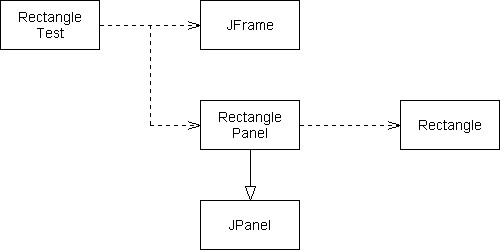
public class RectangleTest
{
   public static void main(String[] args)
   {
      RectanglePanel rectPanel = new RectanglePanel();

      JFrame appFrame = new JFrame();
      appFrame.setDefaultCloseOperation(JFrame.EXIT_ON_CLOSE);
      appFrame.setContentPane(rectPanel);
      appFrame.pack();
      appFrame.show();
   }
}
import java.awt.event.MouseEvent;
import java.awt.event.MouseListener;
import java.awt.Dimension;
import java.awt.Graphics;
import java.awt.Graphics2D;
import java.awt.Rectangle;
import javax.swing.JPanel;

/**
   A rectangle panel displays a rectangle that a user can
   move by clicking the mouse.
*/
public class RectanglePanel extends JPanel
{
   /**
      Constructs a rectangle panel with the rectangle at a
      default location.
   */
   public RectanglePanel()
   {
      setPreferredSize(new Dimension(PANEL_WIDTH, PANEL_HEIGHT));

      // the rectangle that the paint method draws
      box = new Rectangle(BOX_X, BOX_Y,
         BOX_WIDTH, BOX_HEIGHT);

      // add mouse press listener

      class MousePressListener implements MouseListener
      {
         public void mousePressed(MouseEvent event)
         {
            int x = event.getX();
            int y = event.getY();
            box.setLocation(x, y);
            repaint();
         }

         // do-nothing methods
         public void mouseReleased(MouseEvent event) {}
         public void mouseClicked(MouseEvent event) {}
         public void mouseEntered(MouseEvent event) {}
         public void mouseExited(MouseEvent event) {}
      }

      MouseListener listener = new MousePressListener();
      addMouseListener(listener);
   }

   public void paintComponent(Graphics g)
   {
      super.paintComponent(g);
      Graphics2D g2 = (Graphics2D)g;
      g2.draw(box);
   }

   private Rectangle box;
   private static final int BOX_X = 100;
   private static final int BOX_Y = 100;
   private static final int BOX_WIDTH = 20;
   private static final int BOX_HEIGHT = 30;

   private static final int PANEL_WIDTH = 300;
   private static final int PANEL_HEIGHT = 300;
}
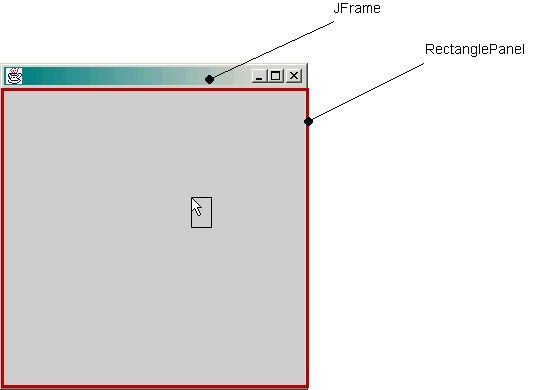
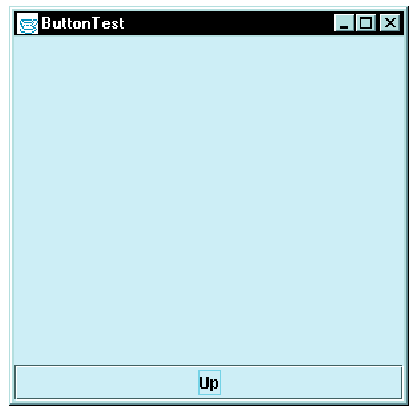
panel.setLayout(new BorderLayout());
panel.add(textField, BorderLayout.SOUTH);
frame.getContentPane().add(textField, BorderLayout.SOUTH);
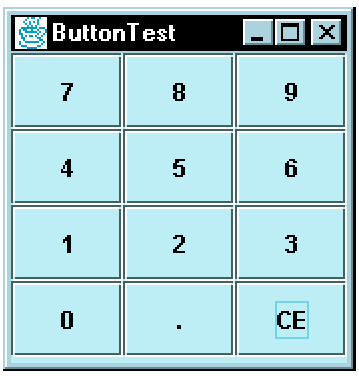
    panel.setLayout(new GridLayout(4, 3));
    panel.add(button7);
    panel.add(button8);
    panel.add(button9);
    panel.add(button6);
public class RectangleFrame extends JFrame
{
    public RectangleFrame()
    {
        add components to content pane
    }
}
public class RectangleTest
{
    public static void main(String[] args)
    {
        construct and display frame
    }
}
class RectanglePanel extends Panel
{
     . . .
     public void setLocation(int x, int y)
     {
         box.setLocation(x, y);
         repaint();
     }
}
import javax.swing.JFrame;

/**
   This program tests the RectangleFrame.
*/
public class RectangleTest
{
   public static void main(String[] args)
   {
      JFrame appFrame = new RectangleFrame();
      appFrame.setDefaultCloseOperation(JFrame.EXIT_ON_CLOSE);
      appFrame.show();
   }
}
import java.awt.BorderLayout;
import java.awt.event.ActionEvent;
import java.awt.event.ActionListener;
import javax.swing.JButton;
import javax.swing.JFrame;
import javax.swing.JLabel;
import javax.swing.JPanel;
import javax.swing.JTextField;

/**
   This frame contains a panel that displays a rectangle
   and a panel of text fields to specify the rectangle position.
*/
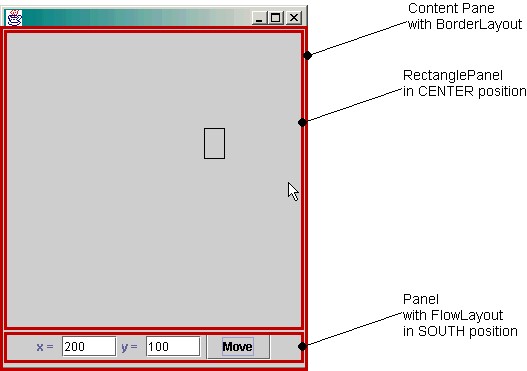
public class RectangleFrame extends JFrame
{
   /**
      Constructs the frame.
   */
   public RectangleFrame()
   {
      // the panel that draws the rectangle
      rectPanel = new RectanglePanel();

      // add panel to content Pane
      getContentPane().add(rectPanel, BorderLayout.CENTER);

      createControlPanel();

      pack();
   }

   /**
      Creates the control panel with the text fields
      at the bottom of the frame.
   */
   private void createControlPanel()
   {
      // the text fields for entering the x- and y-coordinates
      final JTextField xField = new JTextField(5);
      final JTextField yField = new JTextField(5);

      // the button to move the rectangle
      JButton moveButton = new JButton("Move");

      class MoveButtonListener implements ActionListener
      {
         public void actionPerformed(ActionEvent event)
         {
            int x = Integer.parseInt(xField.getText());
            int y = Integer.parseInt(yField.getText());
            rectPanel.setLocation(x, y);
         }
      }

      ActionListener listener = new MoveButtonListener();
      moveButton.addActionListener(listener);

      // the labels for labeling the text fields
      JLabel xLabel = new JLabel("x = ");
      JLabel yLabel = new JLabel("y = ");

      // the panel for holding the user interface components
      JPanel controlPanel = new JPanel();

      controlPanel.add(xLabel);
      controlPanel.add(xField);
      controlPanel.add(yLabel);
      controlPanel.add(yField);
      controlPanel.add(moveButton);

      getContentPane().add(controlPanel, BorderLayout.SOUTH);
   }

   private RectanglePanel rectPanel;
}
import java.awt.Dimension;
import java.awt.Graphics;
import java.awt.Graphics2D;
import java.awt.Rectangle;
import javax.swing.JPanel;

/**
   This panel displays a rectangle.
*/
public class RectanglePanel extends JPanel
{
   /**
      Constructs a rectangle panel with the rectangle at a
      default location.
   */
   public RectanglePanel()
   {
      setPreferredSize(new Dimension(PANEL_WIDTH, PANEL_HEIGHT));
      // the rectangle that the paint method draws
      box = new Rectangle(BOX_X, BOX_Y,
         BOX_WIDTH, BOX_HEIGHT);
   }

   /**
      Sets the location of the rectangle and repaints the panel.
      @param x the x-coordinate of the top left corner of the rectangle
      @param y the y-coordinate of the top left corner of the rectangle
   */
   public void setLocation(int x, int y)
   {
      box.setLocation(x, y);
      repaint();
   }

   public void paintComponent(Graphics g)
   {
      super.paintComponent(g);
      Graphics2D g2 = (Graphics2D)g;
      g2.draw(box);
   }

   private Rectangle box;
   private static final int BOX_X = 100;
   private static final int BOX_Y = 100;
   private static final int BOX_WIDTH = 20;
   private static final int BOX_HEIGHT = 30;

   private static final int PANEL_WIDTH = 300;
   private static final int PANEL_HEIGHT = 300;
}
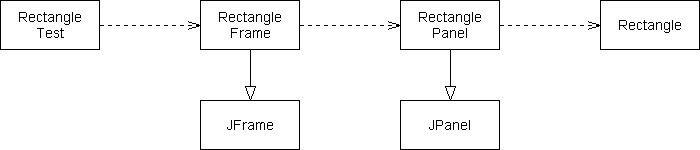
sButton = new JRadioButton("Small");
mButton = new JRadioButton("Medium");
lButton = new JRadioButton("Large");
ButtonGroup group = new ButtonGroup();
group.add(sbutton);
group.add(mbutton);
group.add(lbutton);panel.add(sButton);
if (sButton.isSelected()) . . .
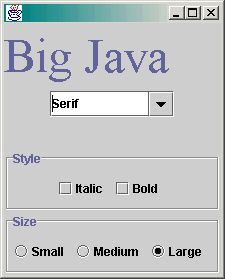
JCheckBox it = new JCheckBox("Italic");
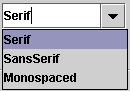
JComboBox faceName = new JComboBox();
faceName.addItem("Serif");
faceName.addItem("SansSerif");
. . .sel= (String)faceName.getSelectedItem();
import javax.swing.JFrame;

/**
   This program tests the ChoiceFrame.
*/
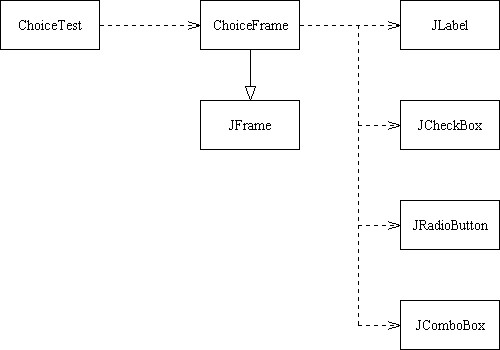
public class ChoiceTest
{
   public static void main(String[] args)
   {
      JFrame frame = new ChoiceFrame();
      frame.setDefaultCloseOperation(JFrame.EXIT_ON_CLOSE);
      frame.show();
   }
}
import java.awt.BorderLayout;
import java.awt.Container;
import java.awt.Font;
import java.awt.GridLayout;
import java.awt.event.ActionEvent;
import java.awt.event.ActionListener;
import java.awt.event.WindowAdapter;
import java.awt.event.WindowEvent;
import javax.swing.ButtonGroup;
import javax.swing.JButton;
import javax.swing.JCheckBox;
import javax.swing.JComboBox;
import javax.swing.JFrame;
import javax.swing.JLabel;
import javax.swing.JPanel;
import javax.swing.JRadioButton;
import javax.swing.border.EtchedBorder;
import javax.swing.border.TitledBorder;

/**
   This frame contains a text field and a control panel
   to change the font of the text.
*/
public class ChoiceFrame extends JFrame
{
   /**
      Constructs the frame.
   */
   public ChoiceFrame()
   {
      // construct text sample
      sampleField = new JLabel("Big Java");
      getContentPane().add(sampleField, BorderLayout.CENTER);

      // this listener is shared among all components
      class ChoiceListener implements ActionListener
      {
         public void actionPerformed(ActionEvent event)
         {
            setSampleFont();
         }
      }

      listener = new ChoiceListener();

      createControlPanel();
      setSampleFont();
      pack();
   }

   /**
      Creates the control panel to change the font.
   */
   public void createControlPanel()
   {
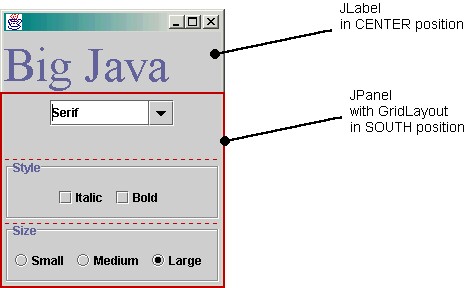
      JPanel facenamePanel = createComboBox();
      JPanel sizeGroupPanel = createCheckBoxes();
      JPanel styleGroupPanel = createRadioButtons();

      // line up component panels

      JPanel controlPanel = new JPanel();
      controlPanel.setLayout(new GridLayout(3, 1));
      controlPanel.add(facenamePanel);
      controlPanel.add(sizeGroupPanel);
      controlPanel.add(styleGroupPanel);

      // add panels to content pane

      getContentPane().add(controlPanel, BorderLayout.SOUTH);
   }

   /**
      Creates the combo box with the font style choices.
      @return the panel containing the combo box
   */
   public JPanel createComboBox()
   {
      facenameCombo = new JComboBox();
      facenameCombo.addItem("Serif");
      facenameCombo.addItem("SansSerif");
      facenameCombo.addItem("Monospaced");
      facenameCombo.setEditable(true);
      facenameCombo.addActionListener(listener);

      JPanel panel = new JPanel();
      panel.add(facenameCombo);
      return panel;
   }

   /**
      Creates the check boxes for selecting bold and italic style
      @return the panel containing the check boxes
   */
   public JPanel createCheckBoxes()
   {
      italicCheckBox = new JCheckBox("Italic");
      italicCheckBox.addActionListener(listener);

      boldCheckBox = new JCheckBox("Bold");
      boldCheckBox.addActionListener(listener);

      JPanel panel = new JPanel();
      panel.add(italicCheckBox);
      panel.add(boldCheckBox);
      panel.setBorder
         (new TitledBorder(new EtchedBorder(), "Style"));

      return panel;
   }

   /**
      Creates the radio buttons to select the font size
      @return the panel containing the radio buttons
   */
   public JPanel createRadioButtons()
   {
      smallButton = new JRadioButton("Small");
      smallButton.addActionListener(listener);

      mediumButton = new JRadioButton("Medium");
      mediumButton.addActionListener(listener);

      largeButton = new JRadioButton("Large");
      largeButton.addActionListener(listener);
      largeButton.setSelected(true);

      // add radio buttons to button group

      ButtonGroup group = new ButtonGroup();
      group.add(smallButton);
      group.add(mediumButton);
      group.add(largeButton);

      JPanel panel = new JPanel();
      panel.add(smallButton);
      panel.add(mediumButton);
      panel.add(largeButton);
      panel.setBorder
         (new TitledBorder(new EtchedBorder(), "Size"));

      return panel;
   }

   /**
      Gets user choice for font name, style, and size
      and sets the font of the text sample.
   */
   public void setSampleFont()
   {  // get font name

      String facename
         = (String)facenameCombo.getSelectedItem();

      // get font style

      int style = 0;
      if (italicCheckBox.isSelected())
         style = style + Font.ITALIC;
      if (boldCheckBox.isSelected())
         style = style + Font.BOLD;

      // get font size

      int size = 0;

      final int SMALL_SIZE = 24;
      final int MEDIUM_SIZE = 36;
      final int LARGE_SIZE = 48;

      if (smallButton.isSelected())
         size = SMALL_SIZE;
      else if (mediumButton.isSelected())
         size = MEDIUM_SIZE;
      else if (largeButton.isSelected())
         size = LARGE_SIZE;

      // set font of text field

      sampleField.setFont(new Font(facename, style, size));
      sampleField.repaint();
   }

   private JLabel sampleField;
   private JCheckBox italicCheckBox;
   private JCheckBox boldCheckBox;
   private JRadioButton smallButton;
   private JRadioButton mediumButton;
   private JRadioButton largeButton;
   private JComboBox facenameCombo;
   private ActionListener listener;
}
JMenuBar bar = new JMenuBar();
frame.setJMenuBar(bar);
JMenu fileMenu = new JMenu("File");
bar.add(fileMenu);
JMenuItem fileNew = new JMenuItem("New");
ActionListener l = ...;
fileNew.addActionListener(l);
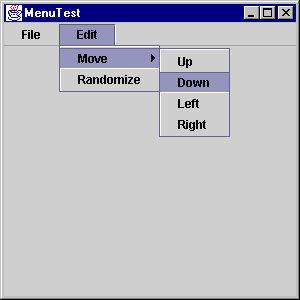
import javax.swing.JFrame;

/**
   This program tests the MenuFrame.
*/
public class MenuTest
{
   public static void main(String[] args)
   {
      JFrame frame = new MenuFrame();
      frame.setDefaultCloseOperation(JFrame.EXIT_ON_CLOSE);
      frame.show();
   }
}
import java.awt.BorderLayout;
import java.awt.event.ActionEvent;
import java.awt.event.ActionListener;
import java.util.Random;
import javax.swing.JFrame;
import javax.swing.JMenu;
import javax.swing.JMenuBar;
import javax.swing.JMenuItem;

/**
   This frame has a menu with commands to set the position of
   a rectangle.
*/
public class MenuFrame extends JFrame
{
   /**
      Constructs the frame.
   */
   public MenuFrame()
   {
      generator = new Random();

      // add drawing panel to content pane

      panel = new RectanglePanel();
      getContentPane().add(panel, BorderLayout.CENTER);

      // construct menu

      JMenuBar menuBar = new JMenuBar();
      setJMenuBar(menuBar);

      menuBar.add(createFileMenu());
      menuBar.add(createEditMenu());
      pack();
   }

   /**
      Creates the File menu.
      @return the menu
   */
   public JMenu createFileMenu()
   {
      JMenu menu = new JMenu("File");
      menu.add(createFileNewItem());
      menu.add(createFileExitItem());
      return menu;
   }

   /**
      Creates the Edit menu.
      @return the menu
   */
   public JMenu createEditMenu()
   {
      JMenu menu = new JMenu("Edit");
      menu.add(createMoveMenu());
      menu.add(createEditRandomizeItem());
      return menu;
   }

   /**
      Creates the Move submenu.
      @return the menu
   */
   public JMenu createMoveMenu()
   {
      JMenu menu = new JMenu("Move");
      menu.add(createMoveItem("Up", 0, -1));
      menu.add(createMoveItem("Down", 0, 1));
      menu.add(createMoveItem("Left", -1, 0));
      menu.add(createMoveItem("Right", 1, 0));
      return menu;
   }

   /**
      Creates the File->New menu item and sets its action listener.
      @return the menu item
   */
   public JMenuItem createFileNewItem()
   {
      JMenuItem item = new JMenuItem("New");
      class MenuItemListener implements ActionListener
      {
         public void actionPerformed(ActionEvent event)
         {
            panel.reset();
         }
      }
      ActionListener listener = new MenuItemListener();
      item.addActionListener(listener);
      return item;
   }

   /**
      Creates the File->Exit menu item and sets its action listener.
      @return the menu item
   */
   public JMenuItem createFileExitItem()
   {
      JMenuItem item = new JMenuItem("Exit");
      class MenuItemListener implements ActionListener
      {
         public void actionPerformed(ActionEvent event)
         {
            System.exit(0);
         }
      }
      ActionListener listener = new MenuItemListener();
      item.addActionListener(listener);
      return item;
   }

   /**
      Creates a menu item to move the rectangle and sets its
      action listener.
      @param label the menu label
      @param dx the amount by which to move the rectangle in x-direction
      @param dy the amount by which to move the rectangle in y-direction
      @return the menu item
   */
   public JMenuItem createMoveItem(String label,
      final int dx, final int dy)
   {
      JMenuItem item = new JMenuItem(label);
      class MenuItemListener implements ActionListener
      {
         public void actionPerformed(ActionEvent event)
         {
            panel.moveRectangle(dx, dy);
         }
      }
      ActionListener listener = new MenuItemListener();
      item.addActionListener(listener);
      return item;
   }

   /**
      Creates the Edit->Randomize menu item and sets its action listener.
      @return the menu item
   */
   public JMenuItem createEditRandomizeItem()
   {
      JMenuItem item = new JMenuItem("Randomize");
      class MenuItemListener implements ActionListener
      {
         public void actionPerformed(ActionEvent event)
         {
            int width = panel.getWidth();
            int height = panel.getHeight();
            int dx = -1 + generator.nextInt(3);
            int dy = -1 + generator.nextInt(3);
            panel.moveRectangle(dx, dy);
         }
      }
      ActionListener listener = new MenuItemListener();
      item.addActionListener(listener);
      return item;
   }

   private RectanglePanel panel;
   private Random generator;
}
import java.awt.Dimension;
import java.awt.Graphics;
import java.awt.Graphics2D;
import java.awt.Rectangle;
import javax.swing.JPanel;

/**
   A panel that shows a rectangle.
*/
class RectanglePanel extends JPanel
{
   /**
      Constructs a panel with the rectangle in the top left
      corner.
   */
   public RectanglePanel()
   {
      setPreferredSize(new Dimension(PANEL_WIDTH, PANEL_HEIGHT));
      // the rectangle that the paint method draws
      box = new Rectangle(0, 0, BOX_WIDTH, BOX_HEIGHT);
   }

   public void paintComponent(Graphics g)
   {
      super.paintComponent(g);
      Graphics2D g2 = (Graphics2D)g;
      g2.draw(box);
   }

   /**
      Resets the rectangle to the top left corner.
   */
   public void reset()
   {
      box.setLocation(0, 0);
      repaint();
   }

   /**
      Moves the rectangle and repaints it. The rectangle
      is moved by multiples of its full width or height.
      @param dx the number of width units
      @param dy the number of height units
   */
   public void moveRectangle(int dx, int dy)
   {
      box.translate(dx * BOX_WIDTH, dy * BOX_HEIGHT);
      repaint();
   }

   private Rectangle box;
   private static final int BOX_WIDTH = 20;
   private static final int BOX_HEIGHT = 30;
   private static final int PANEL_WIDTH = 300;
   private static final int PANEL_HEIGHT = 300;
}